What Should a CV Look Like? Layout & Design Guide
Last updated on 14 May, 2026

Mariusz WawrzyniakWriter, Professional Association of Resume Writers and Career Coaches (PARWCC)
Our customers have been hired by*:
A professional CV needs to be clear and easy to scan. The best CV layouts use consistent formatting, readable fonts, clear section headings, and enough white space to help recruiters quickly find key information.
Quick summary:
- A good CV layout includes contact details, a personal statement, work experience, education, skills, and optional sections like certifications or languages.
- Keep formatting consistent with aligned dates, clear spacing, and uniform bullet points throughout the document.
- Most UK CVs should be one to two pages long, depending on your level of experience and industry.
- Avoid cluttered designs, excessive graphics, tables, or large text blocks that make your CV harder to read or ATS-unfriendly.
Wondering what a strong CV actually looks like? See it in action with our professional CV templates, and start creating your own in just minutes, thanks to our ready-to-use content and actionable expert tips along the way.
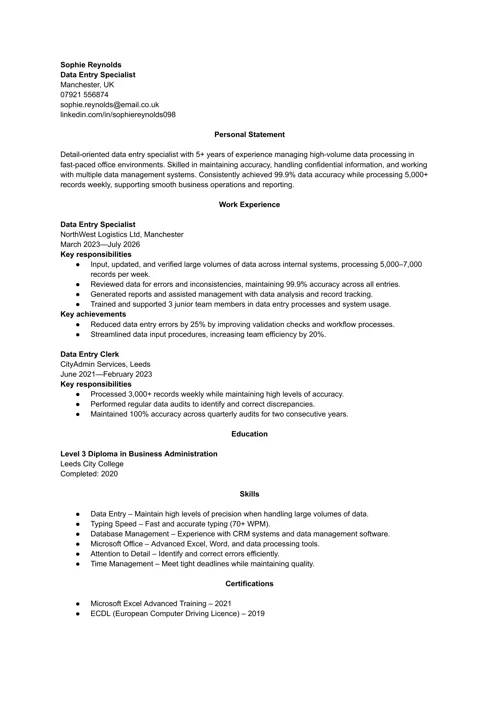
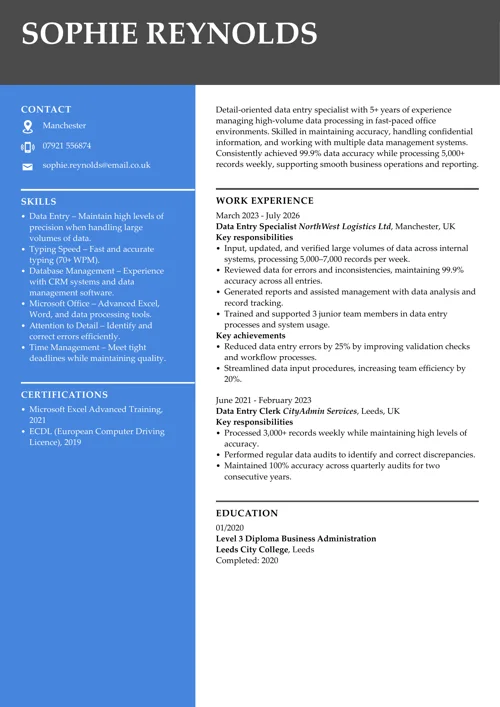
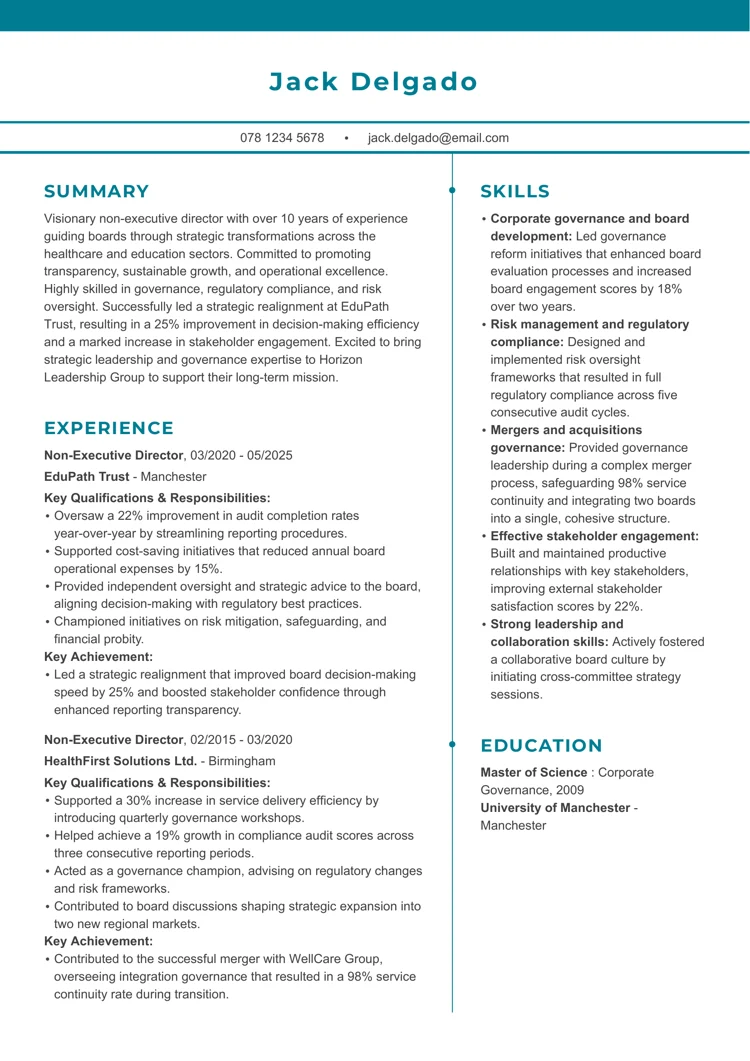
We created the sample on the right using our builder. See other good CV examples like this one.
When writing a CV from scratch, you might need extra help. Check these guides:
- Best AI CV Makers & Builders You Should Test
- Creative CV Template & How to Use It
- CV AI: Should You Use AI to Make a CV?
- CV Writing Services to Help You Write Your CV
- Free AI CV Makers: Full List & Recommendations
- Free CV Templates You Can Use With Ease
- How to Add a CV to LinkedIn?
- How to Use ChatGPT to Write a CV
- How to Write a One-Page CV Document
- Soft Skills Employers Love to See
What does a good CV look like: key sections & layout
A good CV for the UK job market should cover certain essential sections in a clear and logical order. Think of your CV’s layout as a framework that highlights your most relevant information.
Here’s what a good CV should include, in the right order:
Contact details
Contact details should go at the top of your CV. Put your name in a larger font, then add your phone number and professional email address. You can follow it with your city or region and a LinkedIn profile or portfolio link if relevant.
Expert advice: The focus should be on contacting you, not on unnecessary personal data, so skip your full address, date of birth, or a photo – UK employers do not require these, and omitting them helps prevent bias.
Personal profile (CV summary or objective)
A CV personal profile, also referred to as a CV summary or CV objective, is a concise personal statement of 3–5 lines that introduces who you are, what you offer, and your career goals. Place this immediately after your contact info. Infuse it with a bit of personality and enthusiasm to engage the reader.
Professional experience
Your work experience section should begin with your current or most recent job and proceed in reverse chronological order. For each role, include your job title, company name, location, and dates. Use 4–6 bullet points to highlight your primary responsibilities and, importantly, your key achievements, ideally with measurable results. Enhance the impact of bullet points by starting them with a CV action word and structuring them using the PAR (Problem-Action-Result) formula.
Education and qualifications
Start your educational background with the most recent qualification. List your degree or other diplomas, institution names, and dates. You can add notable achievements, such as graduating with first-class honours or completing relevant coursework.
- If you’re a recent graduate or school leaver, this section may come above work experience (especially if you have limited experience).
- If you are an experienced professional, keep the education section brief – just the highest qualification is usually enough.
Key skills
Include a bullet-point list of your most relevant CV skills, ideally 6–10. It’s best to include a mix of soft skills and hard skills. Focus on abilities stated explicitly in the job posting to add CV keywords that are necessary to pass ATS checks.
Expert advice: Pay attention to keywords in the job posting. For instance, if the employer is looking for someone with “project management” and “Python programming”, make sure those appear in your skills or experience sections.
Additional sections
Include extra CV sections if they add value. Common additions include certifications (relevant professional certifications or courses), volunteering experience, awards or honours, languages (with proficiency levels), or hobbies and interests.
Be selective: ask yourself if each extra detail will help you get the job. For most people, it’s best to avoid filling space with unrelated hobbies or trivial achievements.
Remember: The goal is to use your limited CV space for information that proves you’re the right candidate.
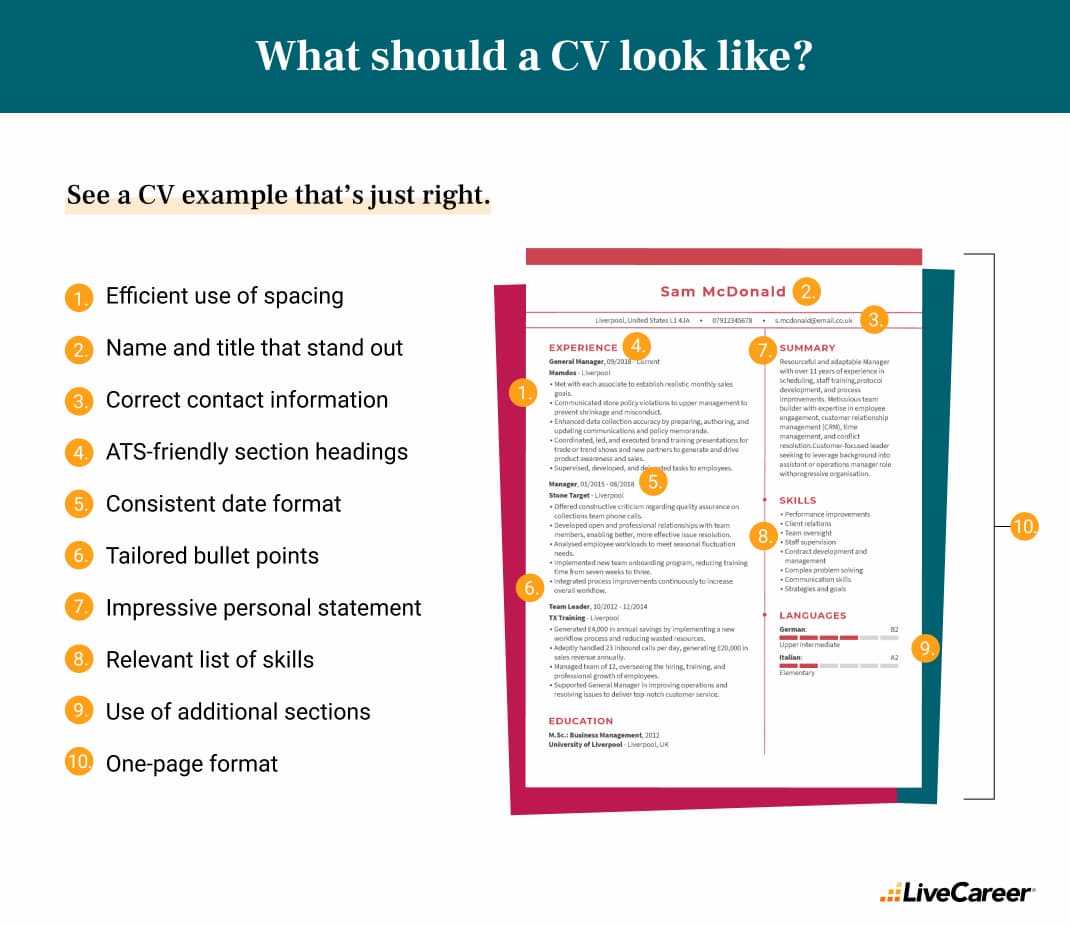
Good-looking CV formatting tips that boost readability
A CV that looks good isn’t about flashy design, but rather about clarity and consistency.
These design tips will help you create a CV that looks polished:
Use the right CV format
A big part of what a CV should look like is selecting the correct CV format. Choose from:
- Reverse-chronological CV format: the most familiar; it lists your work experience starting with your most recent role, making it easy for recruiters to see your career progression.
- Skills-based (functional) CV format: helpful if you’re changing careers or have career breaks; focuses on skills rather than job history.
- Combination CV format: merges both chronological and skills-based approaches, highlighting your key skills while also providing a clear timeline of your work experience.
Choose classic fonts to ensure readability
Choosing the right CV font is crucial when determining the look of a CV. Stick to classic fonts like Arial, Calibri, Helvetica, or Verdana. The best font size is 10–12 points for body text, with slightly larger sizes for section headings to create natural breaks.
Expert advice: Avoid using fancy or overly artistic fonts. They may look creative, but they can make your CV more complicated to read for humans and ATS systems. I recommend sticking to just one font throughout your CV, as using a few can make the text appear messy.
Set standard margins and maintain white space
Don’t squash your text too tightly. Use margins of around 2–2.5 cm (0.75–1 inch) on all sides. Leave enough white space so the page doesn’t look cluttered. A bit of breathing room makes your CV more readable and professional.
Similarly, use a line spacing of approximately 1.15–1.5 for the body text to ensure clarity. Avoid walls of text by breaking up long paragraphs into bullet points and using short sentences. The person reviewing your CV will likely scan it quickly (remember, possibly just seconds at first glance), so make it skimmable.
Put headings above each section
Use clear headings (such as Education, Work Experience, and Skills) to guide the reader. It’s a good idea to bold or underline section titles or use a slightly larger font so they stand out. If a recruiter can instantly spot where each section is, they’ll find the information they need more quickly, which works in your favour. Some candidates even add subtle lines or design elements to separate sections; that’s fine as long as it remains professional.
Keep formatting consistent
Consistent formatting is the key to making a CV look good. Use the same style for headings, bullet points, dates, and fonts throughout your CV. Make sure dates are consistently aligned (either to the right or the left side), and verify that font sizes and colours are uniform. If you want your document to reflect your personality a bit more, add an accent colour to your CV.
Expert advice: Always use the spell check function with apps like Grammarly and Hemingway to ensure your CV is perfect. Research found that applications with only two spelling errors faced a significant penalty, experiencing a 7.3 percentage point reduction in interview probability.
Stick to a reasonable length
How long should a CV be? Long enough to show off your skills and experience, but short enough to stay easy to read. Generally, a good-looking CV should be between one and two pages, depending on your experience level:
- One page is usually the best if you’re a student, recent graduate, or at the early stages of your career.
- Two pages are great for professionals with several years of experience. The secret behind a good CV at this stage is selecting only the most relevant achievements and skills.
Optimise your CV for ATS
90% of companies use ATS software to streamline hiring, so your CV must be ATS-friendly. Avoid images or graphics that an ATS may not be able to read.
You know how to boost the readability of your CV, but we know how to achieve a well-written document in no time. Save time by choosing ready-made personal content written by career experts and adjust it to your needs using the LiveCareer CV builder.
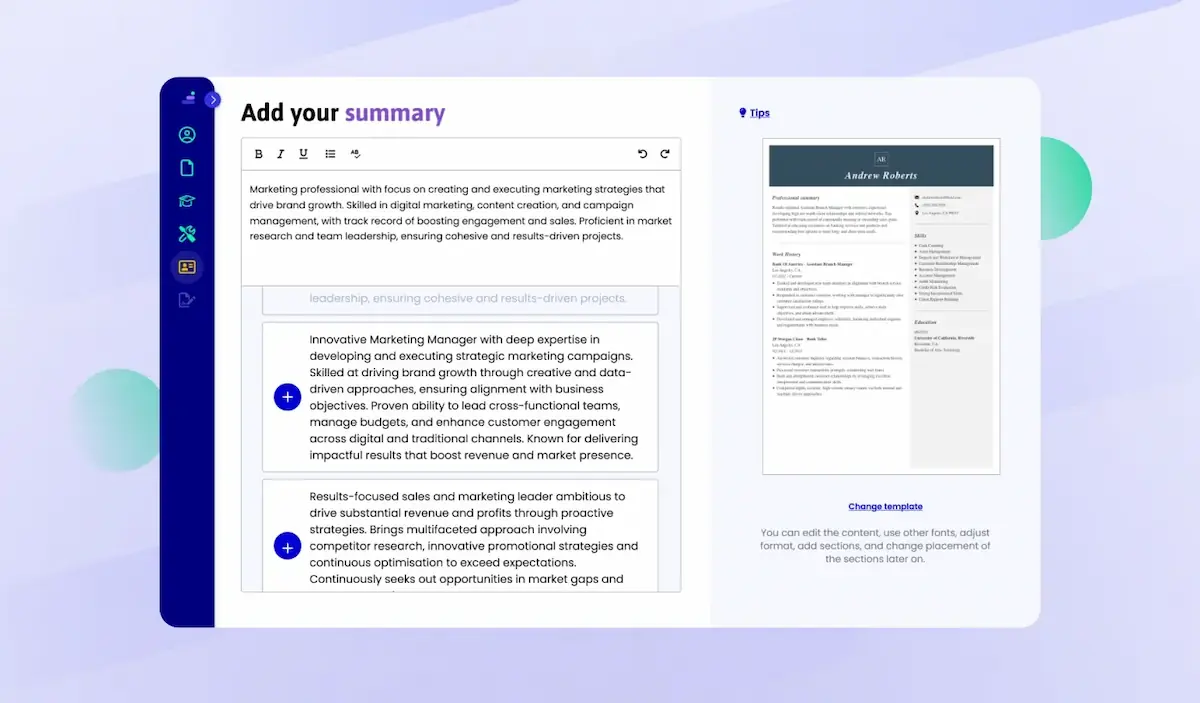
Choose from various content options and adapt them to fit a specific job offer you’re targeting. That’s personalisation 101 that will capture your readers’ attention instantly.
What does a good CV look like: examples
When it comes to making a CV look good, using a CV template is a great idea. A well-designed CV template can save you time, ensure your CV looks professional, and help you get more job interviews.
LiveCareer UK CV templates come with these benefits:
- Consistency: Proper alignment, fonts, and spacing are already built in.
- Save time: You can focus more on crafting great content rather than worrying about formatting.
- ATS-compatible design: Our CV templates are optimised for what recruiters and applicant tracking systems (ATS) prefer today.
- Give guidance: Seeing sample sections and headers shows you what a CV should look like when properly organised.
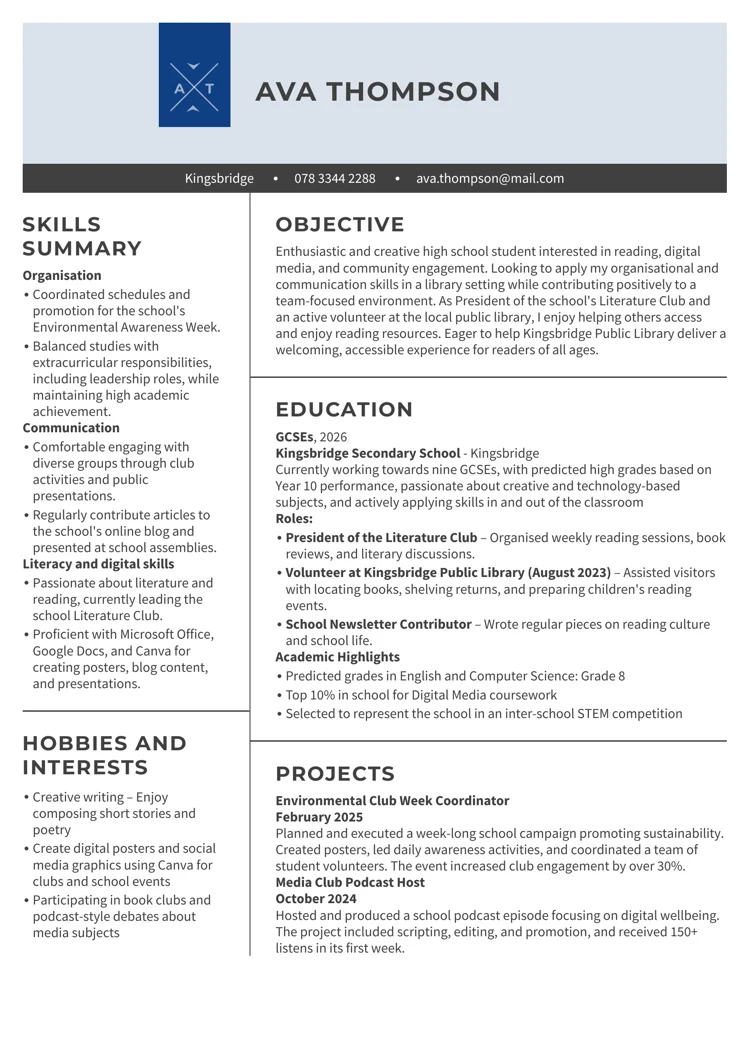
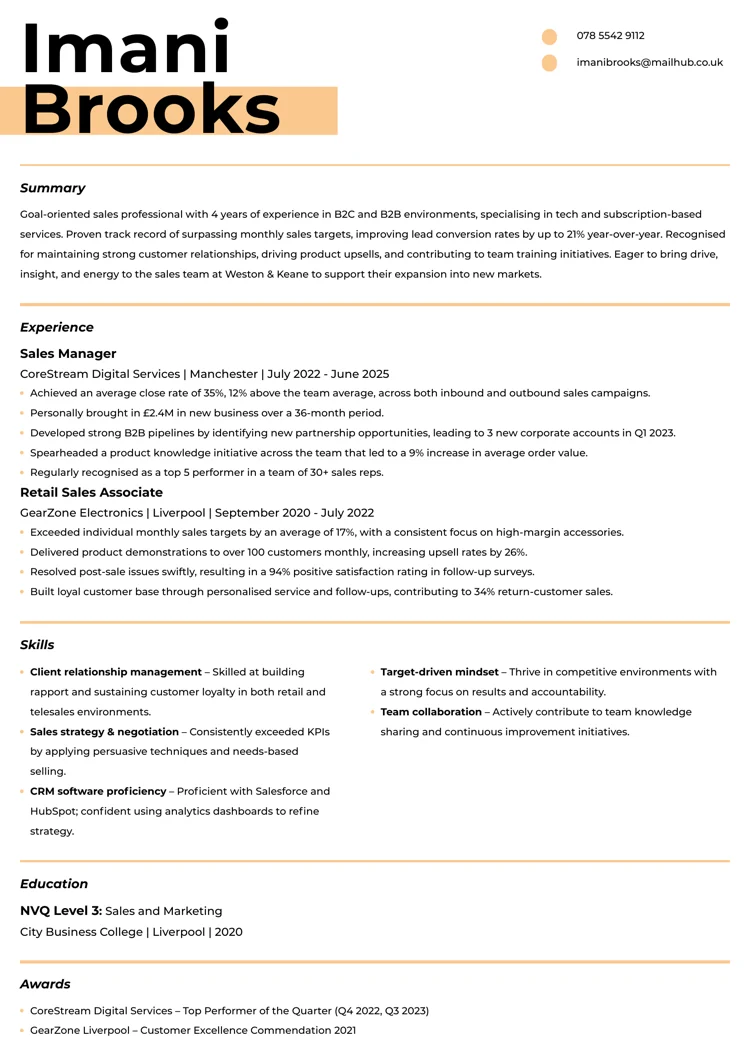
Here are some examples of how your CV will look after you make it with LiveCareer UK CV builder:
Good-looking CV sample for inexperienced candidates
2. Good-looking CV sample for mid-level candidates
3. Good-looking CV sample for senior-level candidates
What makes a CV look good: dos and don’ts checklist
Creating a strong CV is your first step to landing an interview, but knowing what to include and what to avoid can make all the difference. Small mistakes, irrelevant details or poor layout can quickly undermine your chances, no matter how impressive your experience.
Use this checklist of dos and don’ts to make sure your CV stands out for all the right reasons:
Good-looking CV: what it needs
✅ Tailor your CV: Customise it for each job. Highlight the experiences, skills and keywords most relevant to the specific role.
✅ Keep it concise: Aim for 1 page if you have under 5–10 years’ experience; two pages if you have more. Focus on achievements, not every task.
✅ Use a clear layout: Use bold headings, bullet lists and white space to make your CV easy to skim.
✅ Emphasise achievements: Use active verbs and the PAR format to show how you added value.
✅ Mention both hard & soft skills: List technical skills (like software or tools) and interpersonal skills (leadership and communication) with examples of each in context.
✅ Include relevant keywords: Mirror terms from the job description to get past ATS and catch the recruiter’s eye.
✅ Proofread carefully: Even minor errors hurt your credibility. Check spelling, grammar and contact details. (Remember: two typos can cut your interview chances significantly.)
Analysis of 6 million CVs made with LiveCareer UK CV builder reveals that*:
- The average CV is created in 25.92 minutes.
- Over 60% of CVs have fewer than 300 words.
- A typical CV skill section has 6 skills.
- The average number of jobs listed in a CV is 2.85.
*The data comes from a period of 12 months (August 2023–August 2024).
Good-looking CV: mistakes to avoid
⛔ DON’T include a photo or personal details: No headshots, DOB, marital status, etc.
⛔ DON’T lie or exaggerate: Employers can easily verify details, and any dishonesty will likely cost you the job.
⛔ DON’T send a generic CV: Employers notice if a CV isn’t tailored to their role.
⛔ DON’T clutter the layout: Avoid tiny fonts, dense paragraphs or gimmicky graphics. Fancy designs can confuse ATS and overload the reader.
⛔ DON’T list irrelevant jobs or hobbies: Only include roles or activities that support your suitability for this job. Cut anything that doesn’t add value.
⛔ DON’T use slang or abbreviations: Keep language professional. Write dates and details in full (e.g. “January 2025,” not “Jan ’25”). Avoid contractions (“I am” instead of “I’m”).
⛔DON’T forget to update it: A CV is a living document. Make sure that all information (degrees, contact details, recent achievements) is up to date before sending it.
Ready to put all this advice into practice? You don’t need to be a CV expert to get results, because our builder makes it easy for anyone to create a job-winning CV.
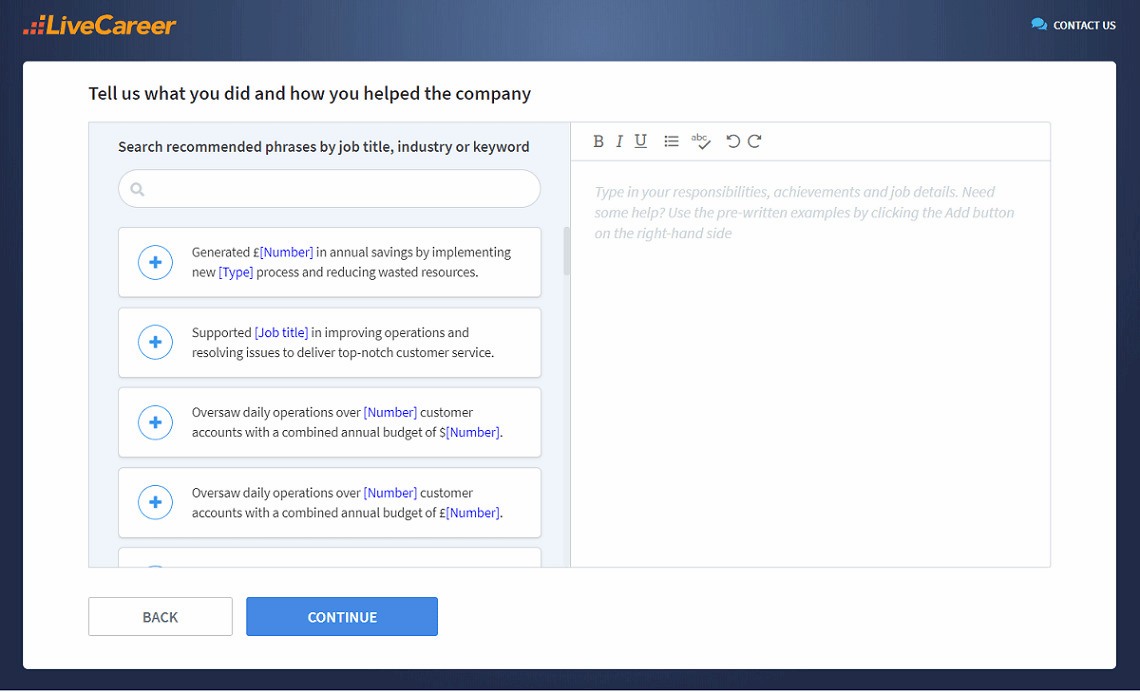
No matter your industry or experience level, LiveCareer’s CV builder has you covered with recruiter-approved ATS-friendly templates and content. Build your CV today and step into your next job with confidence.
Thank you for reading this guide on how a CV should look. I hope this guide has provided valuable insights into creating a polished, effective document that helps your job search. Good luck writing your CV!
How we review the content at LiveCareer
Our editorial team has reviewed this article for compliance with LiveCareer’s editorial guidelines. It’s to ensure that our expert advice and recommendations are consistent across all our career guides and align with current CV and cover letter writing standards and trends. We’re trusted by over 10 million job seekers, supporting them on their way to finding their dream job. Each article is preceded by research and scrutiny to ensure our content responds to current market trends and demand.
Sources
- Office for National Statistics: Labour market overview, UK: February 2026
- Joyla Hodge, “Why you should build a portfolio – Plus constructive tips on how to get started”
- University of Connecticut: Writing Bullet Points
- Augustana College: PAR Method
- National Career Services: How to get work experience
- Spherical Insights: United Kingdom Applicant Tracking System Market Insights Forecasts to 2033
- University of Warwick: Guide to Language Levels
- City University of New York:Sample Reverse Chronological Resume
- Samantha Coates, “White Space: An Overlooked Element of Design”
- University of Arizona in Tucson: Center of Career Readiness Arizona: List of Example Resume Section Headings
- David Farkas, “The Concept of Consistency in Writing and Editing”
- Philippe Sterkens, Ralf Caers, Marijke De Couck, Victor Van Driessche, Michael Geamanu, Stijn Baert, “Costly mistakes: Why and when spelling errors in resumes jeopardise interview chances”
- J. R. Jonivan, “Applicant Tracking System Statistics (Updated for 2026)”
About the author
Mariusz Wawrzyniak
Mariusz Wawrzyniak is a career expert known for crafting data-driven, insightful content that helps job seekers grow and succeed. With a background in engineering and management, he blends research-based advice with real-life experience to guide readers through every step of their career journey.
Looking for a job-winning CV?
Crafting a job-winning CV is all about showcasing your unique skills and experiences. Start with a strong personal statement that highlights your career goals and achievements.
Try Our CV Builder Now